
Worked exampleExported from Calvance
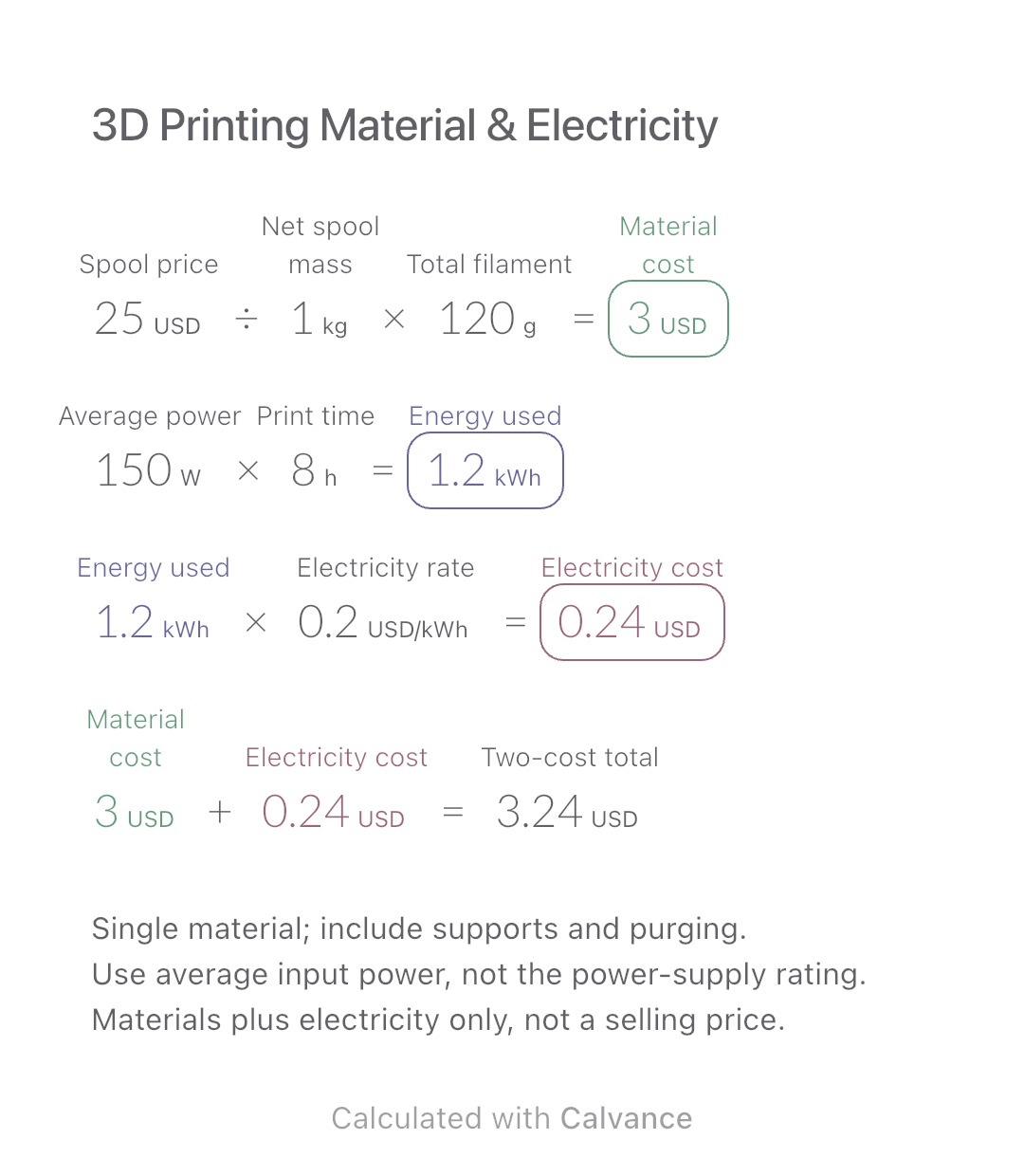
3D Printing Material & Electricity
Use filament weight and print duration from your slicer to estimate material and electricity costs separately, then add the two expenses.
View template and methodConnect the price of butter to the ingredient costs of cookies, pound cakes, and scones. Calculate costs per batch and serving, then download an editable Calvance canvas.
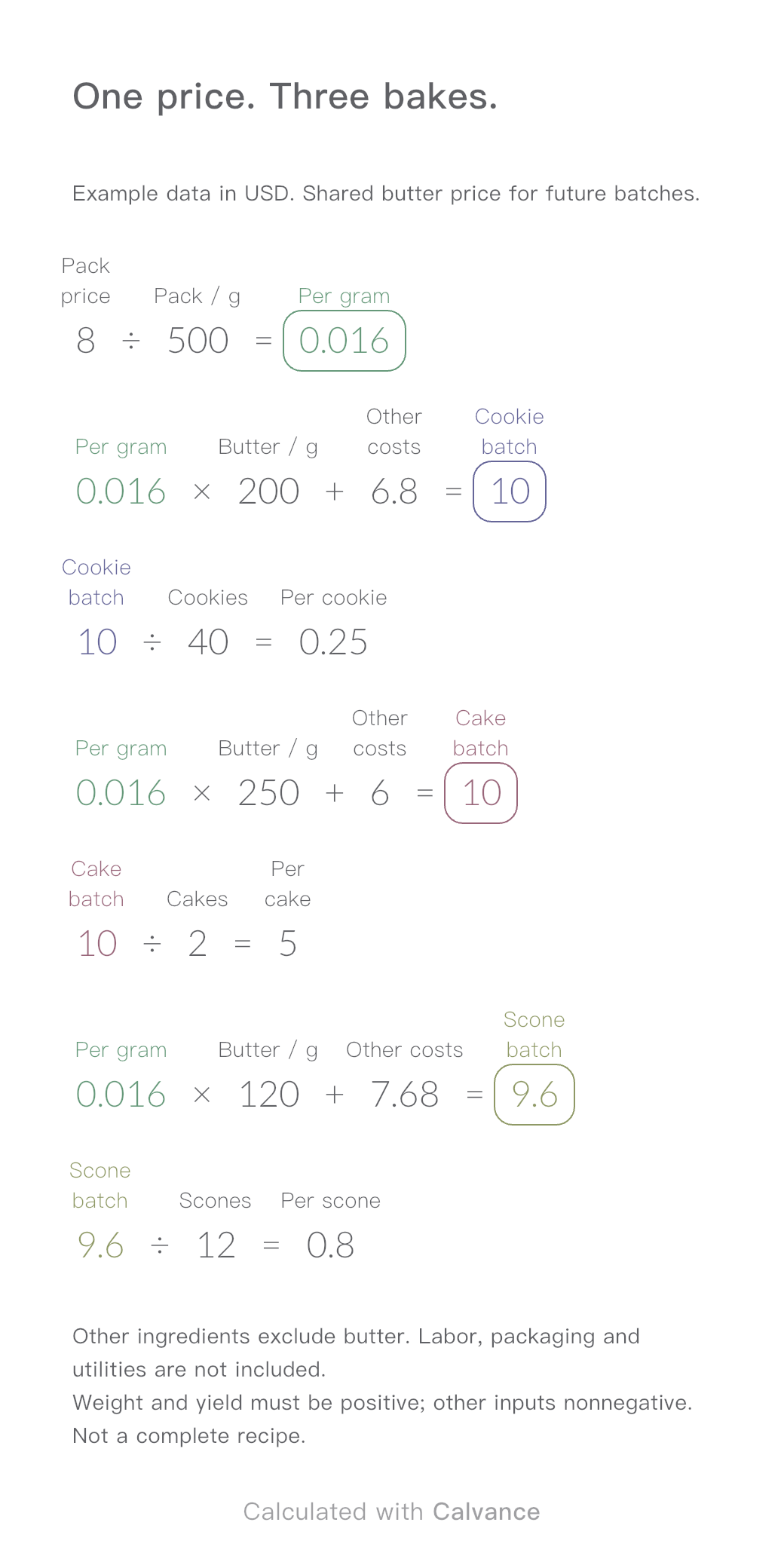
Exported by the iOS App After importing, edit the numbers in Calvance.
When several products use the same butter, a change in its purchase price affects their ingredient costs. This template uses one shared cost per gram, then calculates batch and per-serving costs for cookies, pound cakes, and scones.
In Calvance, replace the pack price, net weight, butter quantities, other ingredient costs, and saleable quantities with your own figures. Next time the price changes, edit the shared butter price to update all three products.
Illustrative ingredient costs only, not current prices or a tested recipe. All monetary inputs and results must use the same currency; no exchange rates are needed. Other ingredient costs exclude butter and cover only the amount used in each batch. Net pack weight and saleable yield must be positive; all other inputs must be nonnegative.
USD
| Inputs | Default |
|---|---|
| Pack price (USD) | 8 |
| Pack (g) | 500 |
| Butter cookies · Butter (g) | 200 |
| Butter cookies · Other costs (USD) | 6.8 |
| Butter cookies · Cookies | 40 |
| Plain pound cakes · Butter (g) | 250 |
| Plain pound cakes · Other costs (USD) | 6 |
| Plain pound cakes · Cakes | 2 |
| Plain scones · Butter (g) | 120 |
| Plain scones · Other costs (USD) | 7.68 |
| Plain scones · Scones | 12 |
First find the butter cost per gram, then each batch’s cost, and finally the cost per serving.
For cookies: 8 ÷ 500 = $0.016/g; the batch costs 0.016 × 200 + 6.80 = $10; each cookie costs 10 ÷ 40 = $0.25.
All three products reference the same butter cost per gram. Changing the pack price updates their batch and per-serving costs together. Other ingredient costs and saleable quantities stay unchanged.
Units now participate in the calculation. Enter each number with its actual compatible unit; changing a label alone does not convert a value. Results convert to the displayed units.
8 [Pack price USD]/500 [Pack g] → Per gram USD/g
Per gram USD/g × 200 [Butter cookies · Butter g] + 6.8 [Butter cookies · Other costs USD] → Cookie batch USD
Cookie batch USD/40 [Butter cookies · Cookies] → Per cookie USD
Per gram USD/g × 250 [Plain pound cakes · Butter g] + 6 [Plain pound cakes · Other costs USD] → Cake batch USD
Cake batch USD/2 [Plain pound cakes · Cakes] → Per cake USD
Per gram USD/g × 120 [Plain scones · Butter g] + 7.68 [Plain scones · Other costs USD] → Scone batch USD
Scone batch USD/12 [Plain scones · Scones] → Per scone USD
Change only the pack price. Keep the pack weight and all other inputs the same. Butter goes from $0.016 to $0.020 per gram.
| Product | Batch cost: $8 → $10 per pack | Cost per serving: $8 → $10 per pack |
|---|---|---|
| Butter cookies | $10 → $10.80 | $0.25 → $0.27 per cookie |
| Plain pound cakes | $10 → $11 | $5 → $5.50 per cake |
| Plain scones | $9.60 → $10.08 | $0.80 → $0.84 per scone |
The download starts at $8 per pack. After importing, try $10 and check these results before entering your own figures.
Other ingredients exclude butter. Labor, packaging and utilities are not included.
Weight and yield must be positive; other inputs nonnegative. Not a complete recipe.
Ingredients only. Labor, packaging, utilities, delivery, and other expenses are excluded. The result is not a complete business cost, selling price, or net profit.
It does not scale a recipe. For a larger batch, update the quantities used, other ingredient costs, and saleable quantity. Changing only the saleable quantity changes how the cost is divided.
It estimates future production. Updating today’s purchase price does not recalculate the actual spending on past batches.
Account for waste yourself. Use realistic saleable yields and include wastage in your ingredient quantities or costs as appropriate. The template does not estimate loss automatically.
Download and import into Calvance to edit the numbers. The canvas does not reject every invalid input; check the stated ranges.
Yes. Edit the numbers, labels, and formulas in Calvance. If several ingredients need independent price changes, give each its own unit cost and references. This file shares the unit cost of one type of butter.
Change the pack price and net weight together. For a 400 g pack, enter that pack’s price. Do not combine the price of one size with the weight of another.
This template calculates changes in ingredient costs only. Pricing also depends on other expenses, target profit, and your business circumstances. The results are not a selling-price recommendation.
Importing does not require a subscription, but the imported canvas uses one canvas from your allowance. The trial includes one local canvas, Local Pro includes 20, and Local Unlimited has no limit. Premium adds cross-device sync while subscribed. See plans.
We recommend using the latest version of Calvance.
Use filament weight and print duration from your slicer to estimate material and electricity costs separately, then add the two expenses.
View template and method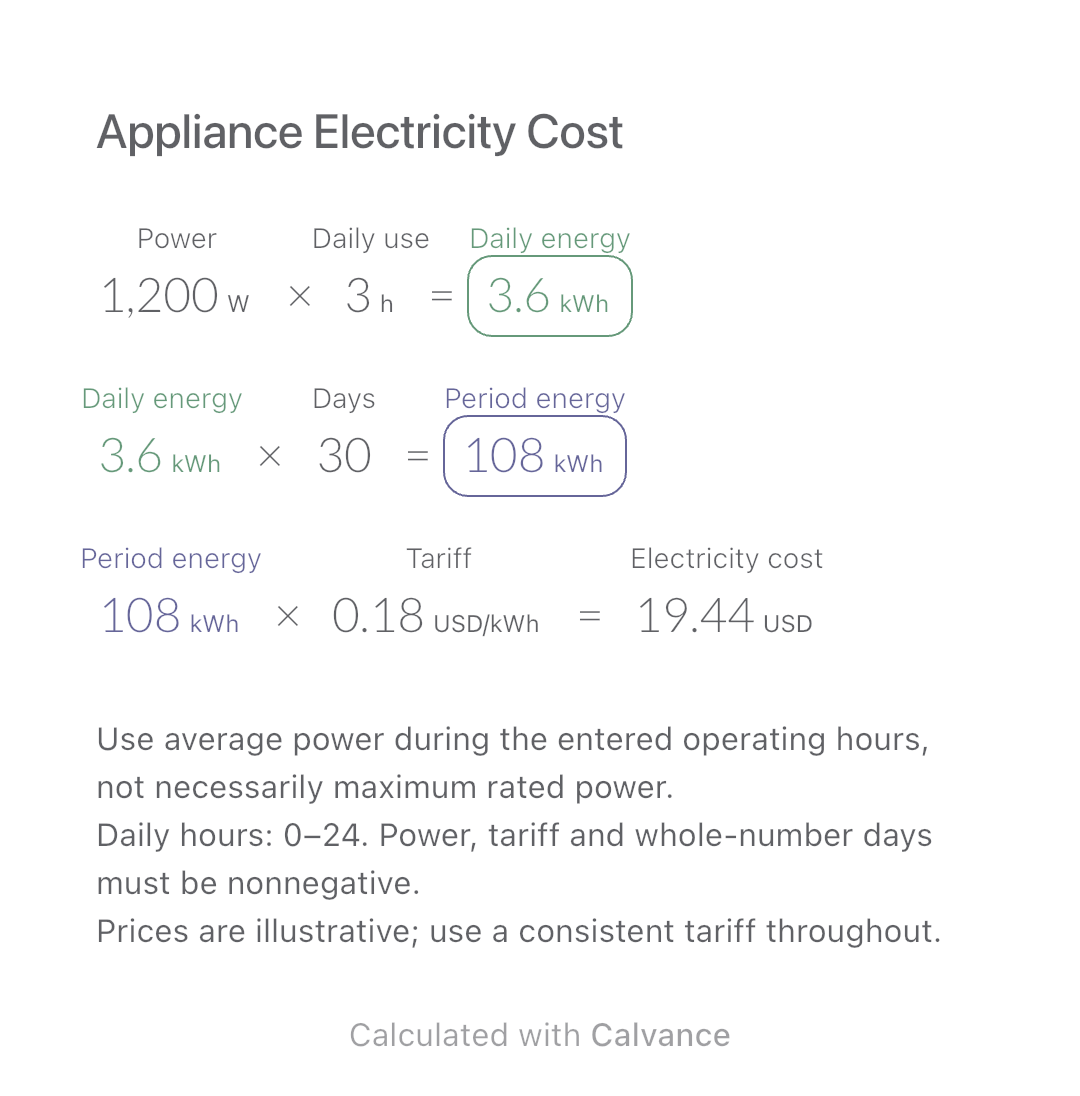
Estimate an appliance’s daily kWh, energy use over a chosen number of days and electricity cost. Change usage hours in an editable calculation canvas.
View template and method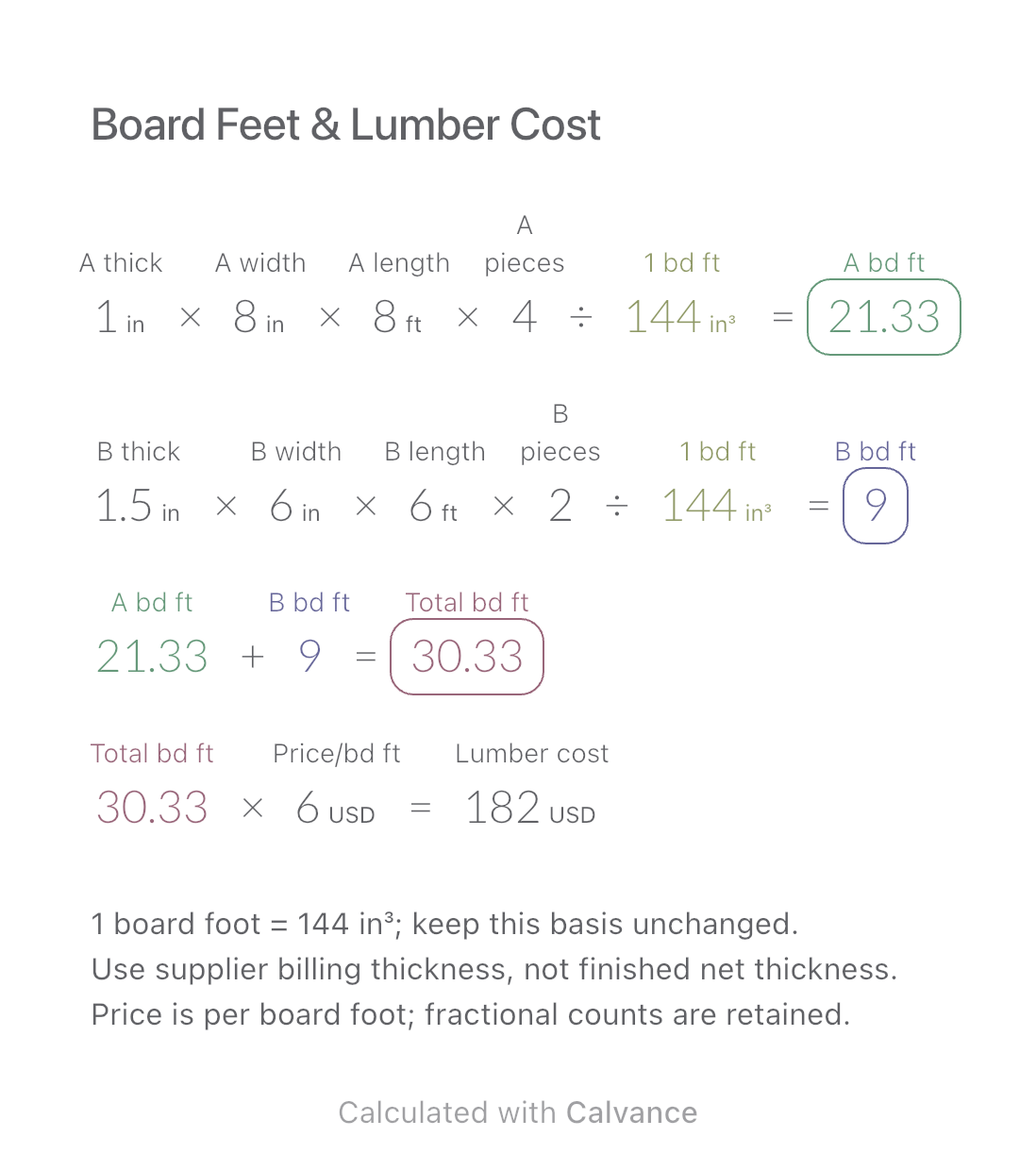
Add board footage for two lumber sizes and estimate purchase cost at one price per board foot. Keep dimensions and piece counts together for later changes.
View template and methodChoose a plan when you need more canvases, high-resolution image exports, or sync across devices.